
Inventory and POs

See your stock wherever it sits, and which SKUs need a PO.

Sellopod tracks your stock in Amazon FBA, your 3PL, your own warehouse and on purchase orders in one place, and labels each SKU and warehouse from your forecast, supplier lead time and open POs. Works with Amazon US, UK and EU marketplaces.

Sign up

1 month free trial, no credit card required

Book a call

Our sales team walks you through Sellopod with demo data on Google Meet.

One stock view instead of three screens and a spreadsheet

The old way. Open Seller Central for FBA stock. Log in to the 3PL portal (your third-party logistics warehouse) for what's on its shelves. Check your PO list for what's still with suppliers. Copy it all into a reorder spreadsheet and add it up.

In Sellopod. Your stock in each warehouse (Amazon FBA, your 3PL and your own) sits in one place, with stock movements, transfers between warehouses, purchase orders to suppliers and your monthly forecasts beside it. The adding up is done before you start.

Already paying for tools that cover profit or ads? Compare them on one question: do they show your stock in each location, including what's on order, against your own forecast?

Your Amazon Ads spend and sales sit next to your sales and stock too. See Amazon Ads reporting · See profit next to stock

Our own setup, as of October 2, 2026

Sellopod was built by a group of Amazon sellers to manage their own businesses, and we still run our own Amazon business on it. Our stock is split the way yours may be. As of October 2, 2026, our account in Sellopod holds:

  • FBA stock in Amazon US, UK and EU warehouses
  • a UK 3PL and a US 3PL warehouse that runs ShipHero, both syncing stock levels automatically
  • Walmart Fulfillment Services (WFS) stock
  • two more US warehouses
  • 478 purchase orders, 5,345 transfers between warehouses and 173 monthly forecasts recorded

These are our own figures, from our own account. They describe how we use Sellopod, not results for anyone else.

Six labels, from three numbers you already have

Sellopod gives every SKU in every warehouse one of six labels:

  • OK
  • PO Needed
  • Low
  • Critical
  • Critical (No PO)
  • Out of Stock

Each label is worked out from three inputs:

  1. Your forecast: the monthly figure you set for each listing.
  2. Your supplier's lead time: how long a PO takes to arrive.
  3. Your open purchase orders: stock already on its way.

Because the inputs are yours, you can see why a SKU carries its label and change the input if it's wrong.

You set the forecast

Sellopod doesn't forecast demand for you. Forecasts are monthly figures you set per listing; Sellopod has no statistical, seasonal or AI demand model. It takes your numbers, your lead times and your open POs and does the arithmetic. The only projections it makes on its own are straight-line run rates from your recent sales: a this-month forecast on the dashboard and a projected out-of-stock date at the current month's sales rate.

That's deliberate. You know about next month's promotion and the supplier who ships late, and your forecast and lead times can carry that.

Not for you if you want software that works out demand for you or suggests order quantities. Sellopod tells you which SKUs need a PO by your own numbers; it doesn't decide what to order.

Where the stock comes from

Stock levels

  • Amazon FBA: your FBA stock for Amazon US, UK and EU, one figure per marketplace region.
  • 3PLs: Sellopod syncs stock levels from Huboo and from 3PL warehouses that run ShipHero or Mintsoft (warehouse software that 3PLs run), next to your Amazon FBA stock.
  • Walmart: your Walmart Fulfillment Services (WFS) stock levels.
Orders

  • Orders from Walmart US, Shopify and WooCommerce come in alongside your Amazon sales.
  • TikTok Shop orders come in too. Shopify and TikTok Shop are import-only; Sellopod does not change those stores.

Using another 3PL? Book a call and we'll go through your setup.

Purchase orders and transfers, next to the stock

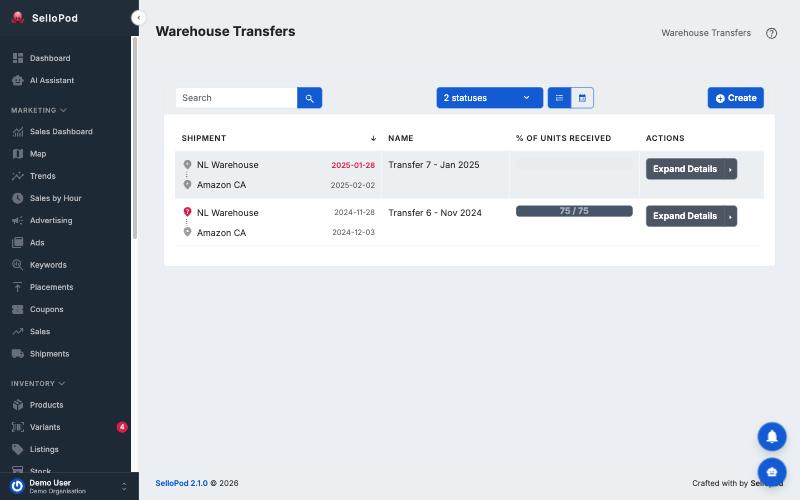
Sellopod tracks purchase orders to suppliers and transfers between warehouses, such as from a 3PL or your own warehouse into FBA, in the same place as the stock. Open POs feed each SKU's label, so stock you've already ordered is part of the picture before you raise another PO.

Two warehouse transfers from a 3PL warehouse to Amazon CA, with dates and the percentage received; demo data.
Demo data

From sign-up to your first stock check

  1. Connect Amazon and your other stores.
  2. Add your suppliers' lead times and your monthly forecasts.
  3. Check stock status before you raise POs.

You sign up without a credit card and get every feature for the month. Prefer to see it on demo data first? Book a call and our sales team will walk you through it on Google Meet.

Sign up

1 month free trial, no credit card required, with every feature

Questions about inventory

Does Sellopod forecast demand for me?

No. You set a monthly forecast for each listing. Sellopod has no statistical, seasonal or AI demand model; it uses your forecast with supplier lead times and open purchase orders to label each SKU's stock status. It does show run-rate figures from your recent sales, such as a projected out-of-stock date.

My 3PL isn't Huboo and doesn't run ShipHero or Mintsoft. Can I still use Sellopod?

Book a call and our sales team will go through your setup with you before you sign up.

Does it handle VAT?

No. Sellopod doesn't calculate or file VAT. Keep your VAT tool or accountant alongside it.

Which Amazon marketplaces does it work with?

Sellopod works with Amazon US, UK and EU marketplaces: it imports your Seller Central sales and traffic data from Amazon US, Amazon UK and Amazon's EU marketplaces.

Can I see it before I connect my accounts?

There's no self-serve demo account. Book a call to see demo data, or sign up and connect your own account.

What does it cost?

Prices are on the pricing page, in USD.

Start with the stock you have

Connect your stores, add lead times and forecasts, and see which SKUs need a PO.

Sign up

1 month free trial, no credit card required

Want the method behind reorder timing? Read how to calculate a reorder point